
Users and roles
Every person who uses the console has a user account. What a user can do is decided by their roles, which are given per organization: the same person can be a hunter in one org and read-only in another.
Adding users
Open Users (server and org administrators) and click Add a user:
- Username: for single sign-on users, the name the identity provider
reports (usually the email address, such as
jane@example.com). - Password: only for users who sign in with a password. Leave it empty for SSO users. Passwords must be at least 12 characters, must not be a common password, and must not contain the username.
- Starting role: you can fine-tune roles after creating the user.
New users are asked to set up two-factor sign in the first time they sign in, if the policy requires it.
From the command line on the server:
atlantiraptor --config server.config.yaml user add --role reader jane@example.com
Roles
Roles add up: a user with hunter and artifact_writer can do both.
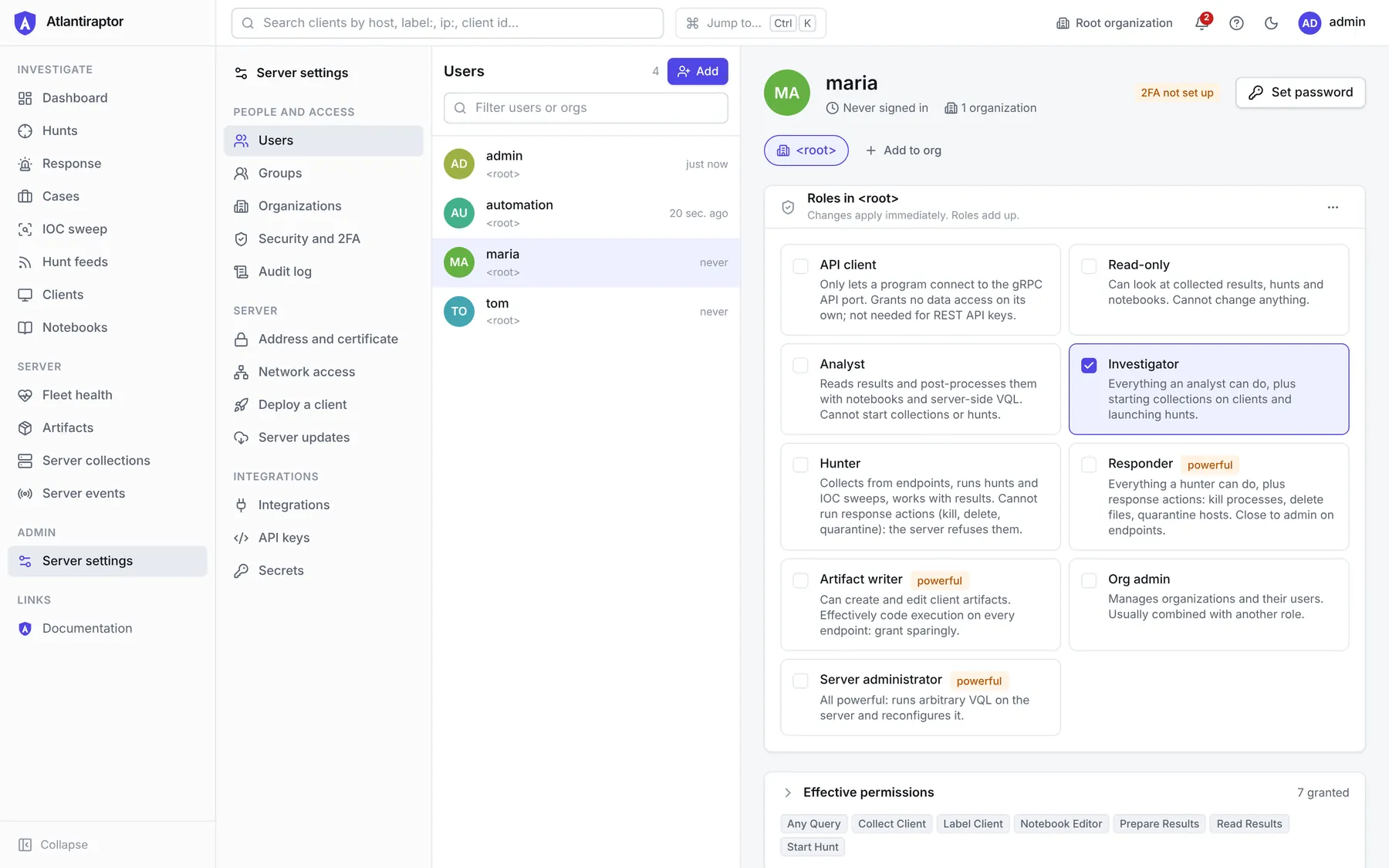
| Role | Label in the console | Can |
|---|---|---|
reader |
Read-only | Look at clients, collected results, hunts and notebooks. Change nothing |
analyst |
Analyst | Everything a reader can, plus notebooks and VQL over collected results, and labelling clients. Cannot collect |
investigator |
Investigator | Everything an analyst can, plus collections on clients and hunts |
hunter |
Hunter | Collect from endpoints, run hunts and IOC sweeps, work with results. Cannot run response actions |
responder |
Responder | Everything a hunter can, plus response actions: kill processes, delete files, quarantine hosts, run shell commands |
artifact_writer |
Artifact writer | Create and edit client artifacts |
org_admin |
Org admin | Create and manage organizations and their users |
administrator |
Server administrator | Everything, including server artifacts, arbitrary VQL on the server and server settings |
api |
API client | For programs connecting to the gRPC API: read results and query them. Not needed for REST API keys |
Warning
artifact_writer,responderandadministratoramount to full control of every endpoint: an artifact can run any command, and response actions change machines. Give them to as few people as possible.
The exact permissions each role grants are listed in Permissions. A user’s page also lets you add single permissions on top of the roles, and shows their Effective permissions in the selected org.
Users in several organizations
A user’s page lists the orgs they belong to. Add to org grants them read-only access to another org; then pick that org and set their roles there. Removing every role in an org removes them from it. See Organizations.
Groups
Groups give roles to many people at once. Members get the group’s
roles on top of their own, in the org where the group is defined, and the
server enforces them like directly assigned roles. For example: “SOC Tier 1”
with hunter, “Incident response” with responder.
Open Groups, click New group, set its name, roles and members, and
Save changes. Members must already be users of the org. Groups that
grant org_admin can only be changed by an org administrator.
With single sign-on, roles can also come from the identity provider’s claims; see Single sign-on.
Resetting a user’s password or two-factor sign in
On the user’s page, Set password sets a new password. If a user has lost their authenticator, an administrator can reset their two-factor setup; they enrol again at the next sign in. See Authentication.
Removing a user
On the user’s page, pick each org and use Remove from org in the roles card’s menu. A user with no org has no access. Their past actions stay in the audit log, and what they created (collections, hunts, notebooks) is kept.
Who did what
Every collection, hunt, notebook and change records who made it. The audit log records sign ins, role changes and administrative actions. See Logging and auditing.