
Integrations
Integrations send Atlantiraptor’s alerts and results to the tools your team already uses, and bring threat intelligence in. Most are server event artifacts; the Integrations page sets up the common ones without writing any VQL.
The Integrations page
Open Integrations (server administrators can change them). Each card shows whether it is Configured, its settings, and buttons to Save, Test it, or Turn off. Send test alert puts one harmless alert in the queue so you can check every forwarder end to end.
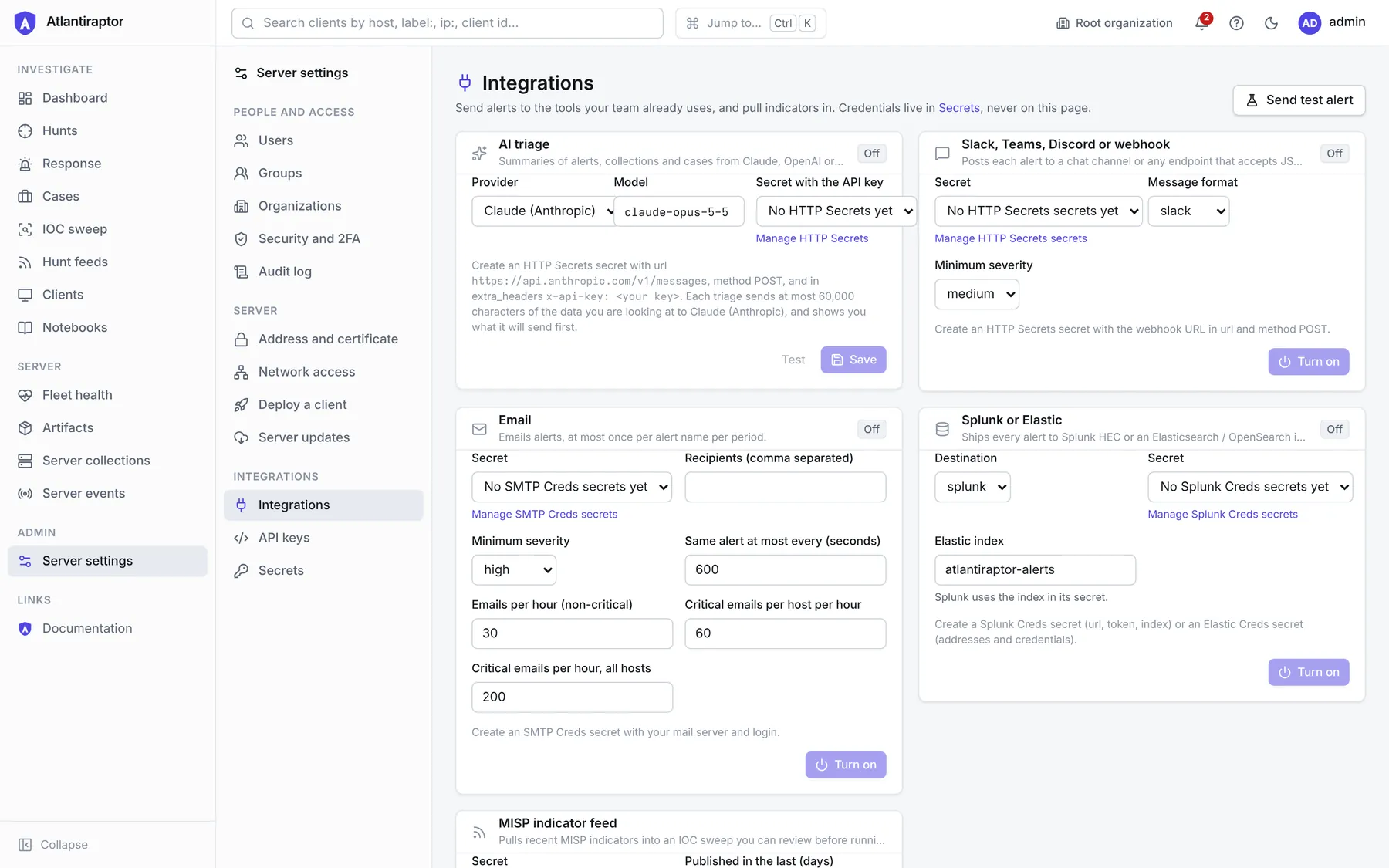
Credentials are never entered on the card itself: each integration uses a secret you create first (the card links to Secrets).
| Integration | Artifact | Secret type | Settings |
|---|---|---|---|
| Slack, Teams, Discord or webhook | Server.Alerts.Webhook |
HTTP Secrets (the webhook URL and any auth headers) | Message format (slack, teams, discord, generic), minimum severity |
Server.Alerts.Email |
SMTP Creds | Recipients, minimum severity, how often the same alert may be mailed, hourly limits | |
| Splunk or Elastic | Server.Alerts.ForwardSIEM |
Splunk Creds (HEC URL, token, index) or Elastic Creds | Destination, Elastic index |
| MISP indicator feed | Server.Import.MISP |
HTTP Secrets | Days back, only indicators flagged for detection |
| AI triage | Provider (Claude, OpenAI or DeepSeek) and model; see AI triage |
Forwarders read the alert queue, so they send alerts from every source:
Sigma and YARA monitors, rapid hunts, your own alert() calls.
Webhook secrets
Create an HTTP Secrets secret with url set to the webhook address
(for Slack and Teams, the incoming webhook URL) and method set to
POST. For endpoints that need a token, add it under extra_headers, for
example Authorization: Bearer ….
Email limits
The email forwarder sends at most one mail per alert name per period, and caps mail per hour, so a noisy rule can’t flood an inbox. Critical alerts have their own, higher limits per host and in total.
MISP
MISP is a threat intelligence sharing platform. Atlantiraptor pulls recent indicators from it into an IOC sweep that you review before running:
- In MISP, create an API key for a user that can read the events you want.
- In Secrets, create an HTTP Secrets secret with
urlset tohttps://<your-misp>/attributes/restSearch,methodset toPOST, and underextra_headersthe lineAuthorization: <api key>. - On Integrations, open MISP indicator feed, pick the secret,
choose how many days back to read and whether to take only indicators
flagged for detection (
to_ids), and click Import into IOC sweep. - Review the indicators on the IOC sweep page and start the sweep.
MISP attribute types are mapped to sweep indicator types: MD5, SHA1 and SHA256 hashes, IP addresses, domains and host names, URLs (as their host name) and file names.
Sending collected results to a SIEM or data store
These server event artifacts upload the results of every finished collection (not only alerts) to a data platform. Add them under Server events with a secret for the destination.
| Destination | Artifact |
|---|---|
| Elasticsearch / OpenSearch | Elastic.Flows.Upload (collections), Elastic.Events.Upload (monitoring events) |
| Splunk | Splunk.Flows.Upload |
| Azure Data Explorer | ADX.Flows.Upload |
| Azure Monitor (Log Analytics) | Azure.Monitor.Upload |
| CrowdStrike Falcon LogScale | LogScale.Flows.Upload, LogScale.Events.Clients |
Each lets you choose which artifacts to send, so you can forward triage results without flooding the SIEM with file listings.
Case management
| Tool | Artifact |
|---|---|
| TheHive | Server.Alerts.TheHive.Alert (an alert per collection with results), Server.Alerts.TheHive.Case (a case per collection) |
| Timesketch | Server.Utils.TimesketchUpload |
Atlantiraptor also has its own cases.
Pulling data instead of pushing it
SIEMs and SOAR platforms can also pull alerts and drive Atlantiraptor through the REST API: see API keys, which includes ready-made settings for common SIEMs.
Your own integration
Any HTTP service can be reached with the http_client() plugin and an
HTTP Secrets secret. A forwarder is a few lines of VQL:
SELECT * FROM foreach(
  row={
    SELECT * FROM watch_monitoring(artifact="Server.Internal.Alerts")
    WHERE event_data.level =~ "high|critical"
  },
  query={
    SELECT Response FROM http_client(
      secret="my-ticketing", method="POST",
      headers=dict(`Content-Type`="application/json"),
      data=serialize(format="json",
                     item=dict(title=name, host=client_id, details=event_data)))
  })
Save it as a SERVER_EVENT artifact and add it under Server events.