
Tamper-evident audit log
Besides the Server.Audit.Logs event stream (see
Server logging and audit), the server
keeps a second copy of every audit event in plain files on its own disk,
outside the datastore. These files are made so that changing, removing,
reordering or adding an entry is detected.
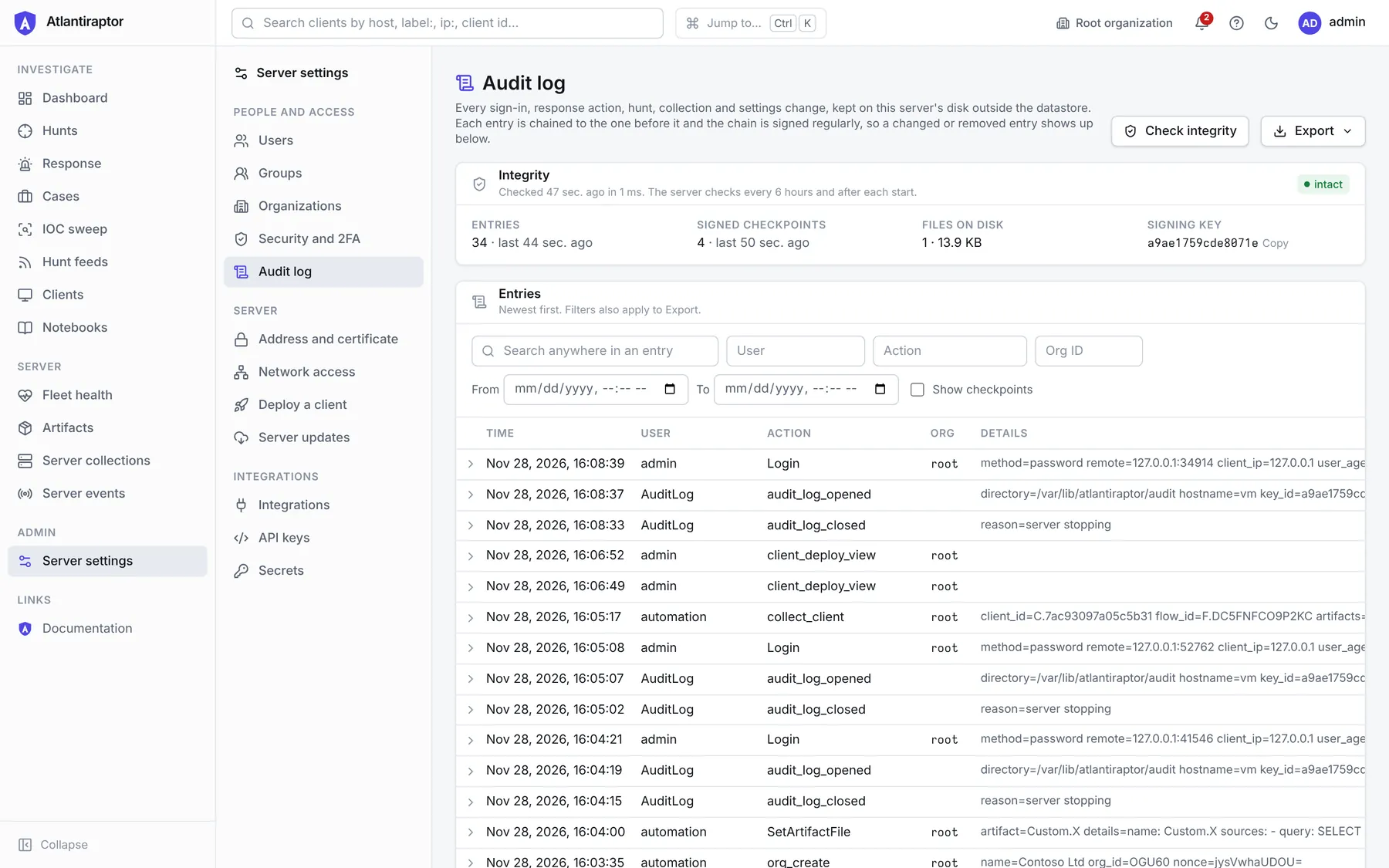
Open it in Server settings > Audit log. Only server administrators can see it.
What is recorded
Everything that goes to the audit log, from every organization:
- signing in (password, SAML, OIDC/SSO, client certificate) and out, failed sign ins, two-factor enrollment, verification, resets and policy changes,
- response actions and approvals, collections started from the console, the
API or VQL (
collect_client), cancelled collections, - hunts created, started, stopped, edited, deleted, and clients added to hunts,
- artifacts added, edited or deleted, notebooks, downloads and exports,
- users, roles, groups, organizations, API keys, secrets,
- server settings: network access, console address and certificate, server and agent updates (including each agent rollout), hunt feeds, monitoring, backups restored,
- the audit log itself: when it opens and closes, its settings, exports, and failed integrity checks.
A password session counts as a new sign in the first time a user is seen from an address, after eight quiet hours, or after signing out.
How tampering is detected
Each entry is one JSON line in a daily file, audit-YYYY-MM-DD.jsonl (UTC):
{"seq":42,"time":"2026-11-28T14:25:16Z","type":"event","org_id":"root","principal":"alice",
 "operation":"CreateHunt","details":{...},"prev":"8eee…","hash":"0df7…"}
seqnumbers entries without gaps, andprevis the hash of the entry before, so every entry is tied to everything written before it.hashis the SHA-256 of the entry. Editing any field changes it.- Every 100 entries, five minutes after the last one when there is activity, at midnight and at shutdown, the server writes a checkpoint signed with its audit key (Ed25519). The key is derived from the server’s secrets key in its configuration file; it is not stored with the log.
- The newest position (number and hash) is also recorded in the datastore, so cutting entries off the end of the files is detected too.
- Files of past days are made read-only. The server never rewrites or deletes them; delete old files yourself if you need to (see below).
The server checks the whole chain when it starts and every six hours. A failed check is shown on the page, written to the server log as an error and recorded in the audit log itself. Check integrity checks it now.
What this protects against: someone who can change files on the server but does not hold the server configuration (with its keys) cannot change the log without it being noticed. Someone with full control of the server could rebuild the log with the server’s own key. Against that, also forward the log to another system (below): the copies there cannot be changed from this server.
Where it is kept
| Default folder | |
|---|---|
| Windows | C:\ProgramData\Atlantiraptor\AuditLog |
| Linux, macOS | atlantiraptor-audit next to the datastore folder |
Change it on the page (a full path, outside the datastore), or fix it with
the environment variable ATLANTIRAPTOR_AUDIT_DIR on the server, which the
page then cannot change. When the folder changes, the server writes a final
signed checkpoint in the old folder and continues in the new one (starting a
chain there, or continuing the one already there). Only one server process
can write a folder at a time.
Space: an entry takes about 300 to 1,000 bytes; a busy server writes a few megabytes a day. Nothing is deleted automatically. To archive, move whole past days away: a log that no longer starts at entry 1 is reported as “earlier entries are missing”, so keep the moved files with the rest when you check them.
Forwarding to syslog or a SIEM
Turn on Forward to syslog or a SIEM and enter host:port and the
protocol (UDP, TCP, or TCP with TLS). Every entry, checkpoints included, is
sent the moment it is written, as an RFC 5424 message (facility local0,
severity notice, app name Atlantiraptor, message ID audit) whose message
is the line exactly as written. A SIEM copy can therefore be checked the same
way as the files.
Browsing and exporting
The page lists entries newest first. Filter by text anywhere in the entry, user, action, organization ID and time, and click an entry to see all its details and its hash. Export downloads the filtered entries:
- JSON lines: the lines exactly as stored. An unfiltered export of all
days can be checked with
audit verify. - CSV: for spreadsheets (cells that start with
=,+,-or@are prefixed with').
Exports are themselves recorded in the audit log.
Checking from the command line
On the server, with its configuration (uses the configured folder, the server’s key and the position recorded in the datastore):
Atlantiraptor.exe --config server.config.yaml audit verify
On any other computer, for a copy of the files, with the public key shown next to the signing key on the page (Copy):
Atlantiraptor.exe audit verify --dir D:\copy\AuditLog --key <public key>
It prints what it checked and every problem, and exits with code 1 if the
log fails. Without --config or --key it can still find edited, missing or
reordered entries, but not whether the log was rebuilt with another key.
| Message | Meaning |
|---|---|
| Entry N was changed after it was written | The content of the entry does not match its hash. |
| Entry N does not follow entry M | An entry was replaced with one whose hash was recomputed. |
| Entries N to M are missing | Lines were removed. |
| The log starts at entry N | Earlier files or lines were removed (or archived elsewhere). |
| …entries were removed from the end | The log ends before the position the server recorded. |
| …not this server’s audit key | The log was rebuilt and signed with another key. |
| The signing key changed (warning) | The server configuration was replaced. Expected after restoring a server onto a new configuration. |
| The last line was cut short (warning) | The server stopped while writing. It records this when it starts again. |