
Rapid hunt
Rapid hunt answers one question fast: which machines have seen this? Paste one indicator, and every online endpoint checks itself and answers. Only machines with a match are listed.
You find it on the dashboard, and you can start it from the command palette or by pivoting on any value in a results table.
Kinds of indicator
The console guesses the kind from what you paste; you can change it.
| Kind | Example | Each machine checks |
|---|---|---|
| Web | evil.example, https://evil.example/x, 203.0.113.7 |
Browser history (Chrome, Edge, Brave, Vivaldi, Opera, Firefox) for the domain and its subdomains, or the IP; the DNS client cache (Windows); live network connections to the IP or to addresses the domain resolves to, with the owning process; Sysmon DNS and network events; the DNS client event log |
| Hash | an MD5, SHA1 or SHA256 | Running process executables, and files under user, temp and ProgramData folders (up to 100 MB each) |
| File | invoice.js, C:\Users\Public\a.exe |
The path itself, files with that name in the same folders, running processes and Prefetch |
| Process | rclone.exe |
Running processes, Prefetch, and Sysmon process start events |
| User | alice, CORP\alice |
Processes running as the user, a profile folder, logons and failed logons (Windows events 4624⁄4625) |
Hash and file checks read files on disk, so they take longer: a few minutes per machine, rather than seconds.
Running one
- Paste the indicator into the Rapid hunt box.
- Check the kind.
- Optionally turn on Run until stopped. Off (the default), the hunt stops after one hour; on, machines that come online later still answer until you stop it.
- Press Enter.
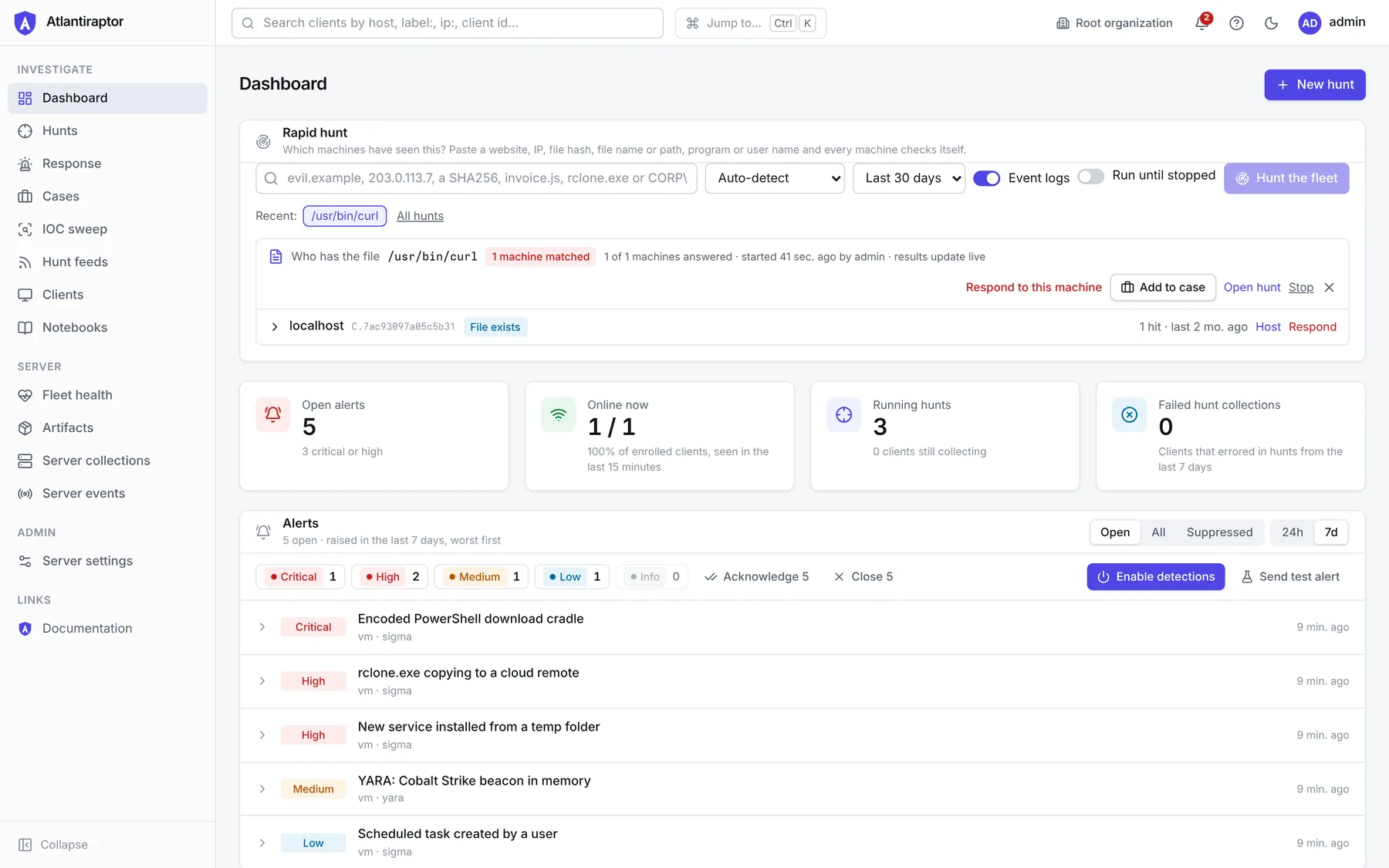
Results appear as machines answer, with each match’s details (which browser and when, which process held the connection, which event). The list of past Rapid hunts is kept below the box.
Under the hood this is a normal hunt of the Generic.Detection.RapidHunt
artifact, so you also find it under Hunts, with its notebook.
What next
From the results:
- Respond: opens Response with the matching machines selected (up to the first 100), to quarantine them or kill a process.
- Add to case: keep the indicator and the hits in a case.
- Open a machine’s host page for full triage.
Several indicators at once? Paste them all: the console sends them to an IOC sweep, which hunts for all of them in one go.
Permissions
Starting a Rapid hunt needs permission to start hunts (hunter role or
higher). Readers and analysts can see the results.
From the API
SIEM and SOAR tools can start a Rapid hunt with
POST /api/atl/v1/rapid-hunts and poll GET /api/atl/v1/rapid-hunts/{id}.
See the REST API reference.