
Authentication
The console supports two ways of signing in, set by GUI.authenticator in
the server configuration:
- Passwords (
type: basic), managed in Atlantiraptor, with two-factor sign in using an authenticator app. - Single sign-on with an identity provider, using OpenID Connect or SAML. The provider handles passwords and its own multi-factor policy.
Whichever you choose, a user also needs roles in an organization before they can see anything. See Users and roles.
Passwords
basic is the wizard’s default. Administrators create users and set
initial passwords on Server settings > Users or with the command line:
atlantiraptor --config server.config.yaml user add alice --role analyst
The command asks for the password. Passwords must be at least 12 characters; a passphrase of four or more words is recommended. Users change their own password under their account menu, Password and two-factor.
Passwords are stored as salted hashes. The server refuses passwords shorter than 12 characters, common passwords, and passwords that contain the username.
Two-factor sign in
Atlantiraptor adds two-factor sign in to password accounts. After the password, the user enters a six-digit code from an authenticator app (Google Authenticator, Microsoft Authenticator, 1Password, or Yubico Authenticator with a YubiKey).
Setting it up as a user
- Open the account menu (top right) and choose Password and two-factor.
- Click to turn two-factor sign in on.
- Scan the QR code with your authenticator app, or type the key by hand.
- Enter the six-digit code the app shows.
- Save the recovery codes in a safe place. Each works once, if you lose your phone. They are not shown again.
Turning two-factor sign in off, or making new recovery codes, needs a current code.
The policy
Server administrators choose who must use two-factor sign in, on the same page under Two-factor policy:
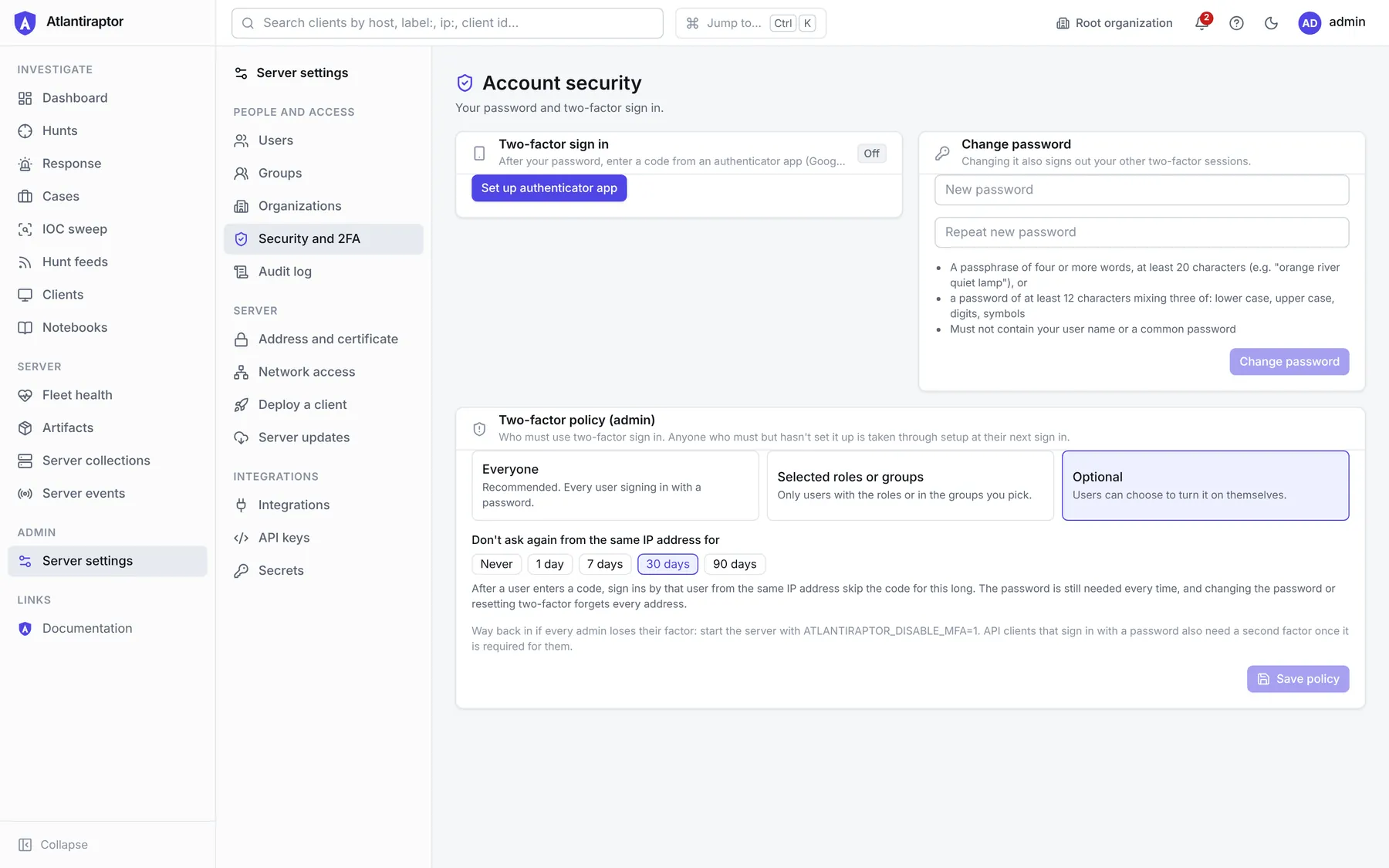
| Policy | Effect |
|---|---|
| Everyone (recommended, the default) | Every user signing in with a password. |
| Selected roles or groups | Only users with the roles or in the groups you pick. |
| Optional | Users can turn it on themselves. |
Users who must use two-factor but have not set it up are taken through the setup at their next sign in, so nobody is locked out by turning the policy on.
Remembering trusted addresses
By default, once a user passes the code from an IP address, later sign ins from the same address skip the code for 30 days. Administrators can change the number of days, or turn remembering off, in the policy (“Don’t ask again from the same IP address for …”). The password is still checked on every sign in. Remembered addresses are kept on the server, so they survive cleared cookies and restarts, and they are forgotten when the user’s password changes or their second factor is reset or turned off.
A user lost their phone
An administrator opens Server settings > Users, selects the user and chooses Reset two-factor sign in. The user sets it up again at the next sign in.
Every administrator lost their factor
Restart the server with the environment variable ATLANTIRAPTOR_DISABLE_MFA=1.
This turns the second factor off for everyone until the server is restarted
without it. It needs access to the server machine itself. Reset the factors
you need, then restart normally.
Single sign-on
With single sign-on, users click a button on the sign-in page and
authenticate with your identity provider. Atlantiraptor uses the e-mail
address (or another claim you choose) as the username. Create the user
first and give them roles; or let unknown users in with
GUI.authenticator.default_roles_for_unknown_user, which grants the
listed roles to anyone the provider accepts (use with care).
The redirect URL to register with the provider is
https://<console address>/auth/<provider>/callback for the built-in
providers (azure, google, github). For generic OIDC it is
https://<console address>/auth/oidc/<oidc_name>/callback, or
/auth/oidc/callback when oidc_name is empty. If the console is
published under a base path, include it.
Microsoft Entra ID (Azure AD)
- In the Entra admin center, register an application (single tenant).
- Add a Web redirect URI:
https://<console>/auth/azure/callback. - Create a client secret.
- Configure:
   GUI:
     authenticator:
       type: azure
       oauth_client_id: <application (client) ID>
       oauth_client_secret: <secret value>
       tenant: <directory (tenant) ID>
Restricting the application to assigned users (Enterprise applications > Properties > Assignment required) controls who can sign in at all.
Create an OAuth client of type Web application in Google Cloud, with the
redirect URI https://<console>/auth/google/callback, and set type: google
with its client ID and secret.
GitHub
Create an OAuth App in GitHub (Settings > Developer settings) with the
callback URL https://<console>/auth/github/callback, and set
type: github with its client ID and secret. Usernames are GitHub logins.
Okta, Keycloak, Authentik, ADFS and other OIDC providers
Any OpenID Connect provider works with type: oidc:
GUI:
  authenticator:
    type: oidc
    oidc_issuer: https://example.okta.com
    oidc_name: Okta
    oauth_client_id: 0oa1example
    oauth_client_secret: example-secret
oidc_issuer is the URL whose /.well-known/openid-configuration the
provider publishes. With the example above, register
https://<console>/auth/oidc/Okta/callback as the redirect URI. Set
oidc_debug: true while setting up, to log the claims the provider sends.
Some providers (Entra ID among them) do not send email_verified; set
claims.allow_unverified_email: true for those.
Roles from the provider. OIDC can also assign roles. Set
claims.roles to the name of the claim that carries the user’s groups or
roles, and map its values to Atlantiraptor roles:
    claims:
      roles: groups
      role_map:
        SOC-Analysts:
          roles: [analyst]
        SOC-Responders:
          roles: [responder]
      override_acls: true
Mapped roles apply in every organization. With override_acls: true the
provider is the source of truth: roles set in the console are replaced at
each sign in, so removing someone from the group removes their access.
SAML
For providers that only speak SAML:
GUI:
  authenticator:
    type: saml
    saml_idp_metadata_url: https://idp.example.com/metadata
    saml_root_url: https://atlantiraptor.example.com/
    saml_user_attribute: email
    saml_certificate: |
      -----BEGIN CERTIFICATE-----
      ...
    saml_private_key: |
      -----BEGIN RSA PRIVATE KEY-----
      ...
Generate the service provider certificate and key with any tool (for
example openssl req -x509 -newkey rsa:2048 -nodes), and give the provider
the metadata URL https://<console>/saml/metadata. saml_user_roles can
grant minimum roles to every SAML user.
Several providers at once
type: multi shows a button for each provider in sub_authenticators.
For example, Entra ID for employees and Google for a partner:
GUI:
  authenticator:
    type: multi
    sub_authenticators:
      - type: azure
        oauth_client_id: ...
        oauth_client_secret: ...
        tenant: ...
      - type: google
        oauth_client_id: ...
        oauth_client_secret: ...
Sub-authenticators must be single sign-on providers, not basic. When the
same e-mail address can come from several OIDC providers, set
disable_email_to_sub_pin: true on them.
Sessions
A signed-in session lasts 24 hours by default
(GUI.authenticator.default_session_expiry_min). Signing out ends it at
once. Changing a user’s password, or resetting their second factor, ends
their other two-factor sessions.
Agents and API clients
Agents and programs do not use these sign-in methods:
- Agents authenticate with their own key, created at enrollment.
- The integration REST API uses API keys
(
Authorization: Bearer atl_...). - The gRPC API uses client certificates issued by the server’s CA.