
Organizations
An organization (org) is an isolated tenant on one server. Each org has its own agents, labels, hunts, collections, notebooks, cases, custom artifacts, client monitoring and server monitoring, and users have roles per org. A managed service provider can serve many customers from one server, and a company can separate subsidiaries that must not see each other’s data.
Every server has a root org (ID root), created at install. Server-wide
settings (updates, network access, the two-factor policy, the hunt feed
licence) live there.
Managing orgs in the console
Open Server settings > Organizations (also reachable from the org switcher in the top bar: Manage organizations…). It lists every org with its ID and number of users, and lets you:
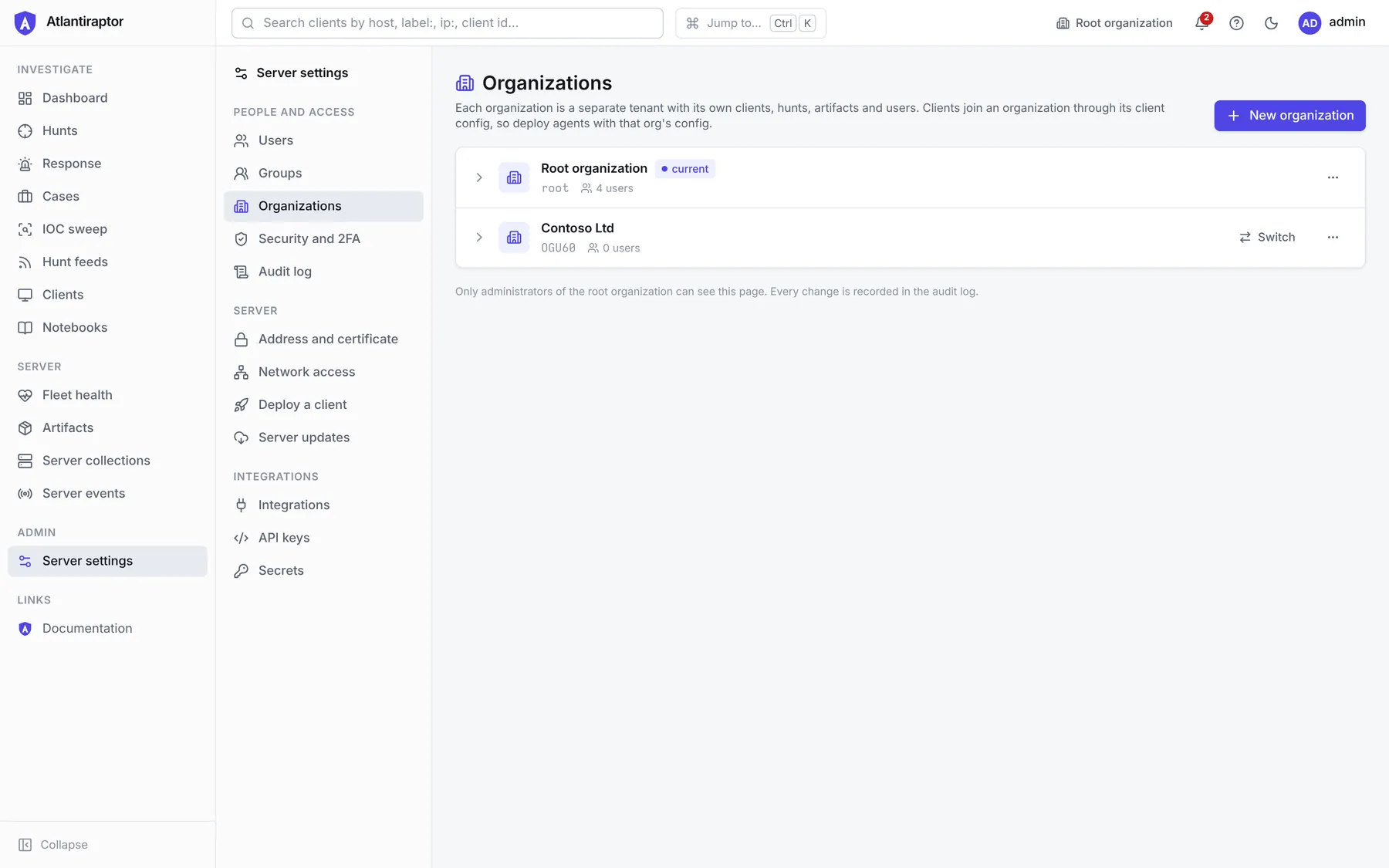
- Create an org with New organization. It gets an ID such as
O1a2b3and you become its administrator, so it appears in your org switcher straight away. - Rename an org. Only the display name changes; the ID and enrolled agents stay as they are.
- Download client config for an org, to build its agents (see below).
- Add users: expand an org to see who has access, grant read-only access to an existing user, and click a person to adjust their roles.
- Switch to an org.
- Delete an org, after typing its name to confirm.
The page and its actions need the ORG_ADMIN permission, which
administrators of the root org have, whichever org the console is showing.
Every change is written to the audit log. The root org can not be renamed
or deleted.
Servers started with Atlantiraptor.exe gui in earlier versions
created a demo org called ACME Inc (ID O123). The Organizations page
points it out; delete it there if you never used it.
Creating an org with an artifact
Server.Orgs.NewOrg also creates an org, and additionally builds agent
packages for it. In the root org:
- Open Server collections and click Collect.
- Choose
Server.Orgs.NewOrg, set OrgName (for exampleAcme Ltd) and collect it.
The artifact creates the org, makes you its administrator, and runs
Server.Utils.CreateMSI and Server.Utils.CreateLinuxPackages inside it,
which build agent packages with the new org’s configuration. Add more
initial artifacts with the InitialArtifacts parameter if you want, for
example client monitoring or custom artifacts every customer needs.
The same with VQL, in a notebook:
SELECT org_create(name="Acme Ltd") FROM scope()
Server.Orgs.ListOrgs (or SELECT * FROM orgs()) lists all orgs.
Agents for an org
Each org has its own client configuration, which carries the org’s ID.
Agents built with it enroll into that org. The packages that
Server.Orgs.NewOrg builds are in that collection’s uploaded files, in the
new org. For an org created in the console, switch to it and collect
Server.Utils.CreateMSI or Server.Utils.CreateLinuxPackages, or use
Download client config on the Organizations page and build packages as
described in
Deploying agents.
All orgs share the server address and CA; an agent cannot move to another org without being reinstalled with that org’s configuration.
Users in several orgs
A user account is server-wide; roles are per org. An analyst at a managed
service provider can be hunter in five customer orgs and reader in
another. Give access on Server settings > Users: select the user, Add to org,
and pick roles. The org switcher in the account menu (Switch
organization) lists the orgs a user has access to. Console URLs carry the
org (?org_id=O1a2b3), so a shared link opens in the right org.
Roles mapped from single sign-on apply to every org; for per-org access, give roles in the console.
Hunting across orgs
A hunt normally runs in the current org. In New hunt, Also run in these organizations starts the same hunt in other orgs where you may hunt. Each org’s results stay in that org.
Artifacts in orgs
Built-in artifacts are available in every org. Custom artifacts belong to
the org they were created in. To add the same custom artifact to several
orgs, create it in each, or use artifact_set() with org_id from the root
org. See Managing artifacts.
Deleting an org
Deleting an org removes its data permanently: its agents’ records, collections, hunts, notebooks, custom artifacts and settings. Users keep their accounts but lose access to the org. Use Delete… on Server settings > Organizations, or from a notebook in the root org, first see what would be removed, then confirm:
SELECT org_delete(org="O1a2b3") FROM scope()
SELECT org_delete(org="O1a2b3", really_do_it=TRUE) FROM scope()
Uninstall the org’s agents first, or they will keep trying to connect.
Moving an org to another server
An org’s data lives in its own folder of the datastore. To move it, the new server must have the same CA (so the agents trust it) and the same address, or the agents must be redeployed. See Backups and disaster recovery.