
Messages
The bell in the top bar shows how many messages you have not read yet. Click it to see the latest ones, or choose Open messages to go to the full inbox.
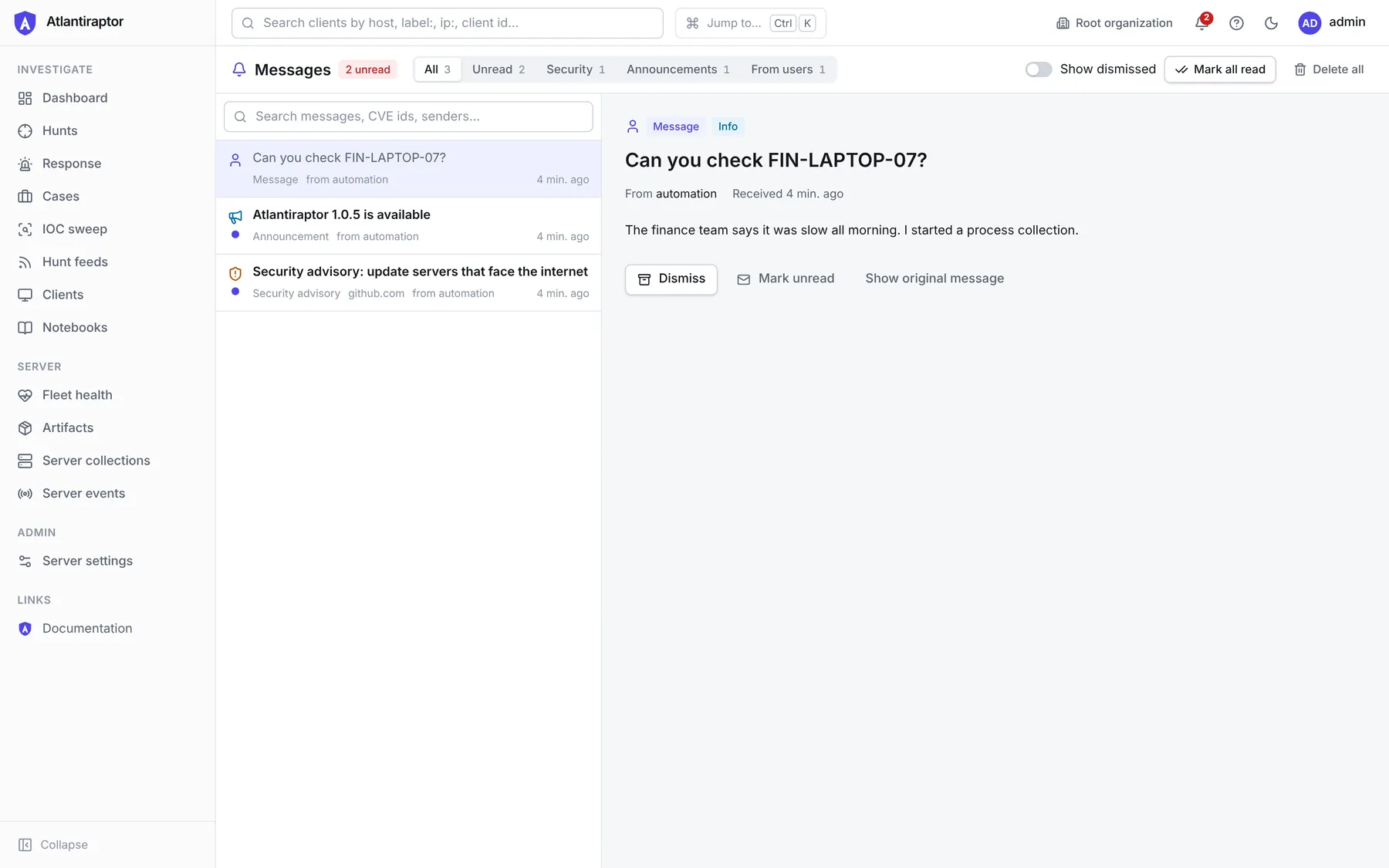
What arrives here
| Tab | What it holds |
|---|---|
| Security | Security advisories for Atlantiraptor. Your server checks the advisory feed and tells every user once. |
| Announcements | Notices from the server and its artifacts, such as a new release. |
| From users | Messages another user or an artifact sent you. |
All shows everything and Unread only what you have not opened. The search box finds messages by text, CVE number or sender.
The same message delivered several times, for example one advisory sent once per organization, shows once with a count.
Reading and tidying up
- Click a message to read all of it. It is then marked as read.
- Mark unread puts it back in the unread count.
- Dismiss hides it. Turn on Show dismissed to see it again.
- Show original message shows exactly what was delivered.
- Mark all read clears the unread count; Delete all removes every message you have.
Links in a message open only if they are ordinary web addresses. Any user can message any other user, so treat links from users with the same care as links in an email.
Each user sees only their own messages. Read and dismissed marks are kept on the server, so they follow you to another browser.
Sending a message
Artifacts and notebooks can message a user with the user_message() VQL
function, for example to tell an analyst that a long collection finished.
See the VQL reference.